NEED/DONE was an SaaS-based app created and designed for a rising generation of dual income head of households in 2015. Need/Done provides instant help from sitters & home-helpers your friends use and trust.
The steady growth in this millennial target presented an awesome opportunity. Especially in a $48+ billion childcare market. So we designed, built and piloted a community–building mobile app to enable parents to collect a local “family,” made up of parent-friends that share trustworthy resources (like sitters, dog walkers, cleaners) with each other.
The Problem
Without the family support nearby we all relied on in the past, it’s a lot harder to take care of kids and family while we all work.
The Solution
Design a mobile application leveraging user profiles to connect parents with caregivers. The platform would support a community endorsed network, provide a task framework with messaging and location services, and progress notifications along the journey through task completion.
The Process
My Role in the project began when I met Creative Producer, Leslie Ali. We were brainstorming a solution for parents seeking last minute childcare based on Leslie's personal experience. Leslie had the idea to leverage her local network of parents to tap into vetted caregivers...the idea took off from there.
Leslie and I gathered a small team to form a 'think-tank.' We were a team of parents, entrepreneurs, a creative producer, a publicist, a designer, and experienced caregivers (part-time nannies), and leaned on our network of tech and creative professionals to break into UX design and SaaS which were entirely emerging fields within the tech boom (think peak UBER & Google Maps).
We individually researched exisiting and adjacent solutions to our problem. We organized insights from existing platforms for local caregivers, community message boards, and search and location services like (Mommy Poppins, Care.com, YELP).
According to the 450 caregivers we polled before running our pilot, what working parents need external support--someone to serve as their trusted proxy at home when they need to be at work.
We learned that parents are used to helping each other out, sharing resources among friends, and call for trusted help when necessary. The challenge however, is reaching out to the network for an immediate or emergency need becasue of how much time and effort that requires.
As a team, we processed research by creating an affinity map to identify pain-points, potential features, and demographic information that would inform our persona (time-poor & career-driven working parents).
Our initial research provided a focus for the work ahead: to create a location-based mobile platform that connected parents with caregivers that could be personalized. Together, we developed a user-flow that would inform the creation of an MVP so that we could move foward in seeking financial investment to continue the project.
I became our team's designer for the MVP. From sketching the interface and navigation icons to designing a series of screens, I completed a solution to guide the user through a task. The user needed to log-in, navigate to search, and successfully interact with a notification icon to message "a network of locally-vetted caregivers."
Task Scenario
It’s 6:45. You’re still at work. And your conference call is still going. You’ll never make it back to the neighborhood in time to pick up your child from her after-school activity.
You log-in to the NEED DONE mobile application to find support.
You navigate to the task prompt titled "Childcare Request" A large button prompts you to select Y / N to send a message to your network. You create a message: “School pick-up in jeopardy. Need Done!” (Y or N)
Press 'Send'. The next screen is your requested task with a progress indicator (Task Progress Screen).
A pop-up prompts you to complete the next step -- to detail information to be provided to the tasker.
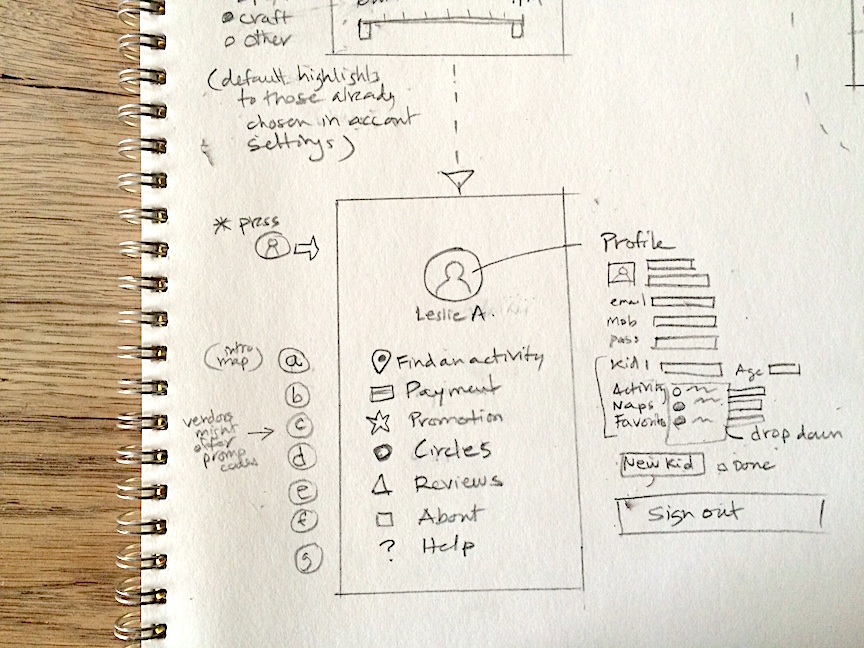
(BACKGROUND) Your profile contains specific details required for any caregiver (Your Name, Your Child's Name, Your Address, School Address, Emergency Contacts, and any extra notes you might want to send to a caregiver).
Your message request gets posted. A pop-up prompts you if you would like to "Notify Family Members of this change in plan" (Y / N)
Select Y to "Notify Family." The pop-up closes and returns you to the Task Progress Screen.
...
You receive a notification, "Tasker 41 Confirms "Childcare Request"
...
You receive progreass notifications from Tasker 41 as they complete Task Milestones: Tasker Arrived (at location), Child Picked Up, Tasker + Child at Destination, etc). The app dispays an indication to view the map interface to track Tasker 41 along the journey.
Once the task is complete, a massive “DONE” message appears on your screen. This task has been completed.
A follow-up pop-up prompts you for feedback on the Tasker “How did Tasker 41 do?” (an easy 5 star rating system can be selected at this point with an optional note and "done" button).
The app thanks you, and the button returns you to the “ Need Done” Dashboard Screen.
(At any time, the user may create additional tasks for Tasker 41 such as "Cook Dinner," "Give Bath," "Read Books.")
Detailed Screen Sketches for Development
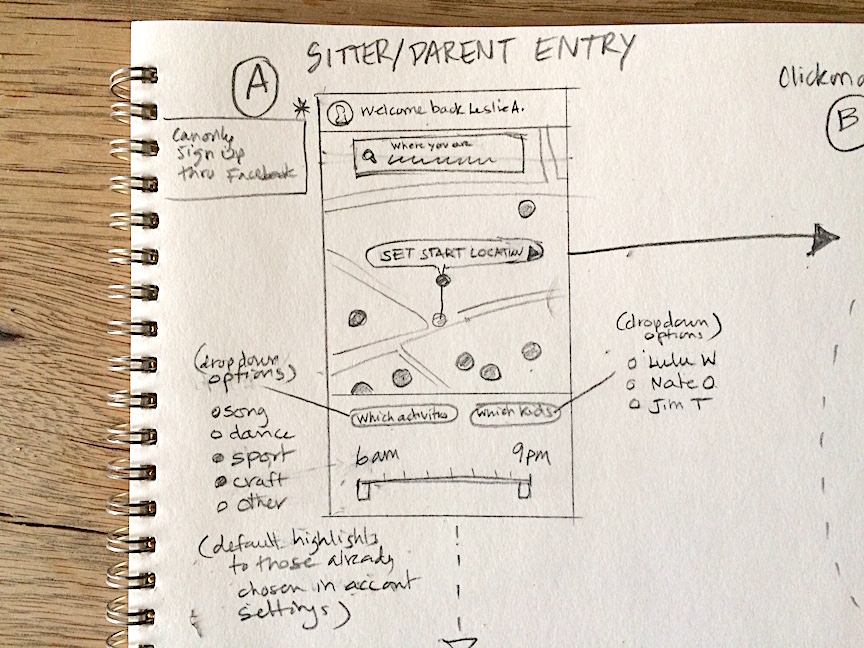
Location & Filtering Sketch
Profile Design Sketch
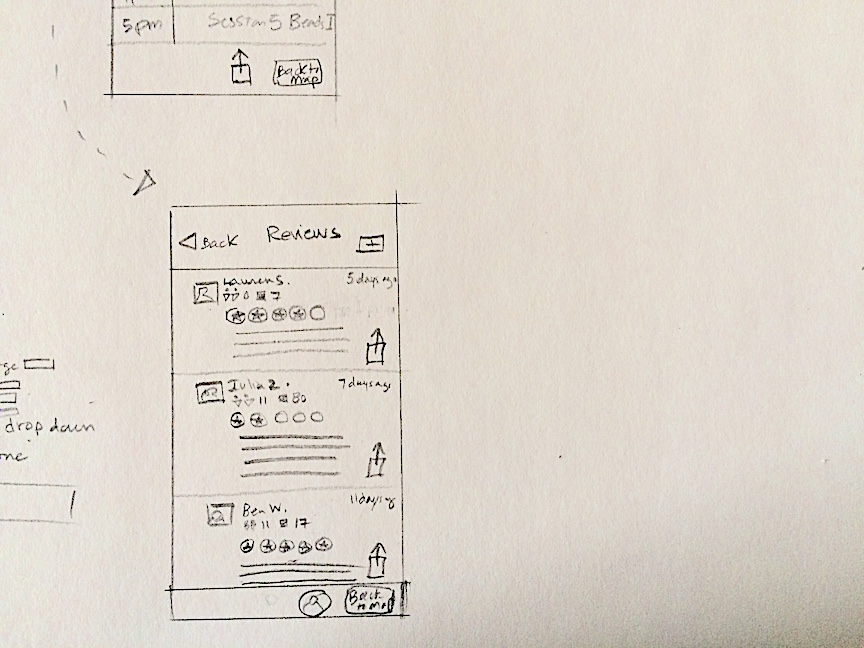
Review Screen Sketch
Results
Through visual storytelling and strategic copywriting, we successfully navigated users to search and find resources and support within the application.
Our next steps included researching competitors for insights into further development - specifically user profile pages, communication interfaces, and geolocation integrations to share with developers.
Interested in working together? Get in touch today.
Discover the difference diverse expertise and passion can make. Reach out for a collaborative partnership focused on your success.